Table of Contents
Base & Surface Extraction
Density Control
Height Variation
Blade Growth
Result & Applications
Base & Surface Extraction
It is not easy to create realistic grass on complex surfaces inside MagicaVoxel without using 3rd party shaders. However there are techniques that can be very helpful to support the manual process. To do so we 1st define a base object where we want to put our grass on. Here, I use a grey rock (object #1) [3] as a support surface. My model volume is 126 x 126 x 107 voxels. Important, the rock must be solid. Means, the whole volume of the rock geometry must be free from empty space between voxels. In this case we apply the flood command to fill all empty spaces.
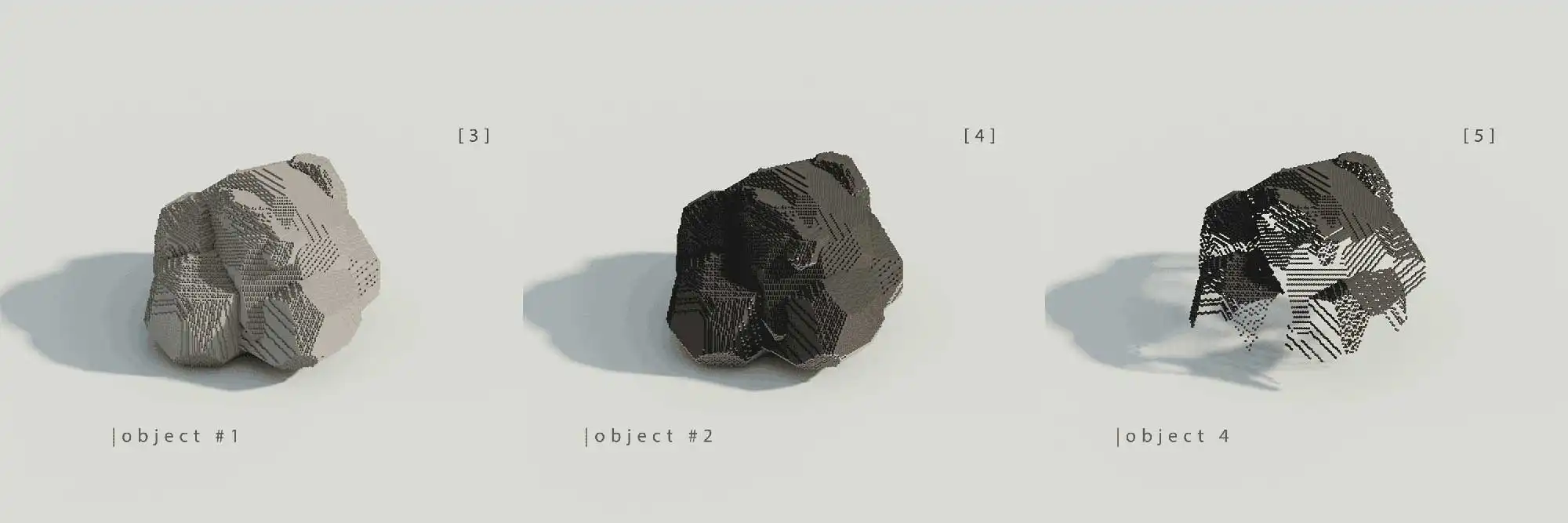
Generating the grass base layer
Next copy the rock (object #2), translate it by +1 voxel towards positive z axis; and apply dark grey colour on the copy [4]. Now make a 2nd copy of the 1st rock (object #1) and apply "operand" property from Boolean menu. Select the dark grey rock (object #2); and apply "sub" property from Boolean menu. Technically, the copy of the 1st gray rock eliminates all voxels from the dark grey rock (object #2), except the top level voxel. The result is that only the top level voxels from our dark grey rock (object #2) remain. By doing this, we generated the base (object #4) [5] of our grass or low level ground vegetation.
Design Rules
- Always start from a solid base volume.
- Grass is derived from surface voxels, not placed arbitrarily.
- Use Boolean operations to extract clean surface layers.
Density Control
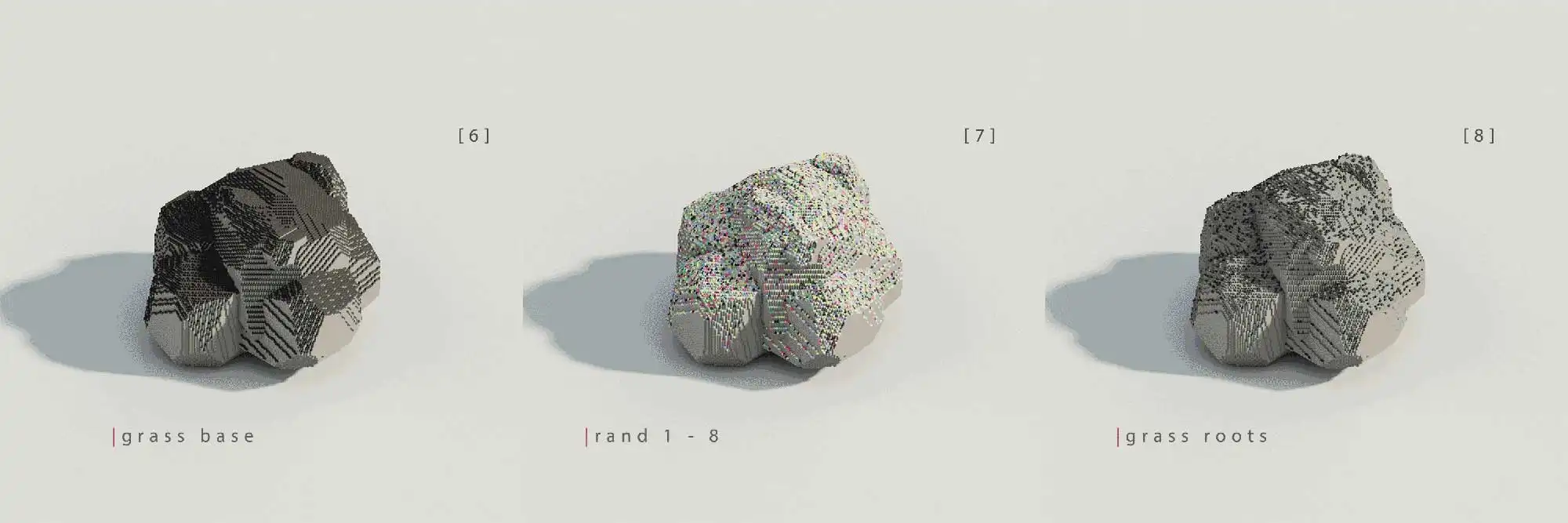
Control of Density by Thinning out the Grass Base layer
All voxels of that grass base are nested now on the 1st gray rock (object #1) [6]. Now select all voxels of the dark gray grass base and execute rand command rand 1 - 8 [7]. This command applies random colors from the first 8 slots in the palette to all grass base voxels. Keep only one color voxel group and delete the rest. By doing this, only sparse single voxels remain on the surface. These remaining voxels define the individual roots of each grass blade root [8]. Additionally, thin out the grass roots manually by delete voxels that directly touch neigbouring voxels. This approach depends on the intended density and application. In most cases "less is more".
Design Rules
- Density is controlled through voxel reduction, not randomness alone.
- Each grass root should remain isolated on the surface.
- Manual thinning improves control and avoids oversaturation.
Height Variation
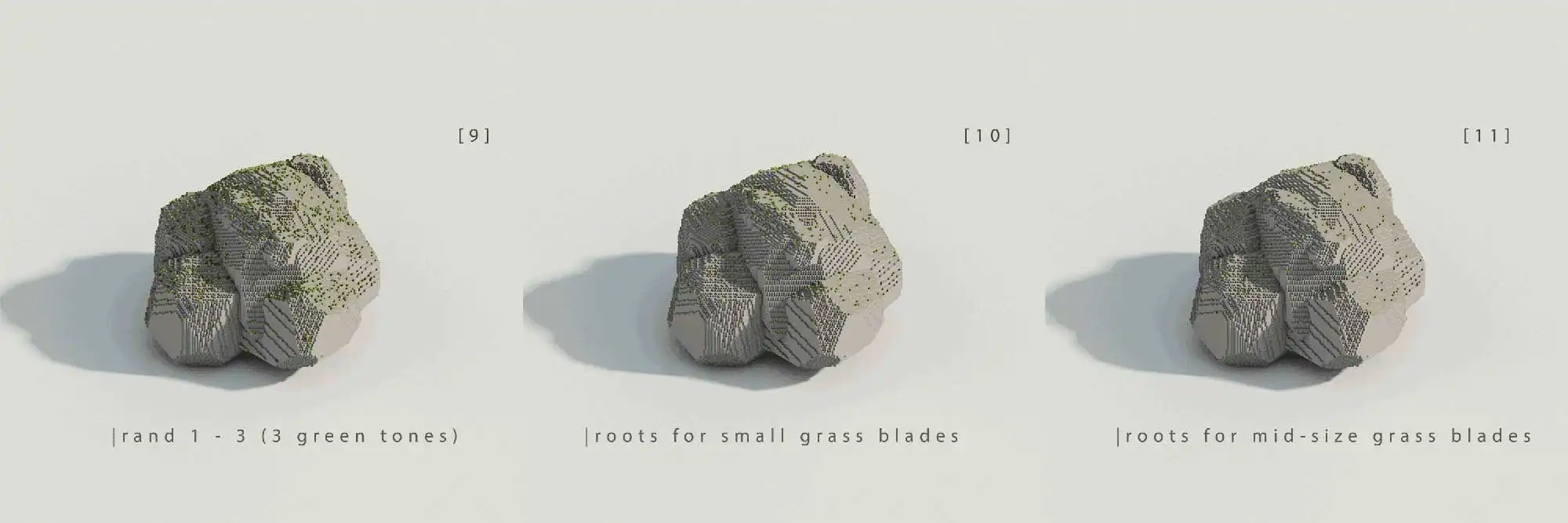
Preperation vor Grass Height Variation
Looks good so far. To achieve a more natural result, grass heigth variation needs to be prepared. Execute rand command "rand 1 - 3" once again on the remaining voxels and apply 3 different tones of green to those randomized voxels [9]. Now we make 2 object copies (object #5 & object #6) of the resulting grass blade roots (object #4). In object #4 we delete all voxels that correspond to the 2nd and 3rd green tone [10]. In object #5 we do the same for the 3rd and 1st green tone [11]. In object #6 we repeat that step for 2nd and 1st green tone. Now, we have 3 different objects that correspond to 1 unique green tone. By doing so, we created the individual grass blade roots for different grass heights. Let us say that 1st green tone will be used for small grass blades (object #4), 2nd green tone for mid-sized grass blades (object #5) and 3rd green tone for tall grass blades (object #6).
Design Rules
- Density is controlled through voxel color randomization.
- Each grass height group corresponds to a unique voxel color.
- Each grass variant must be an independant object.
Blade Growth
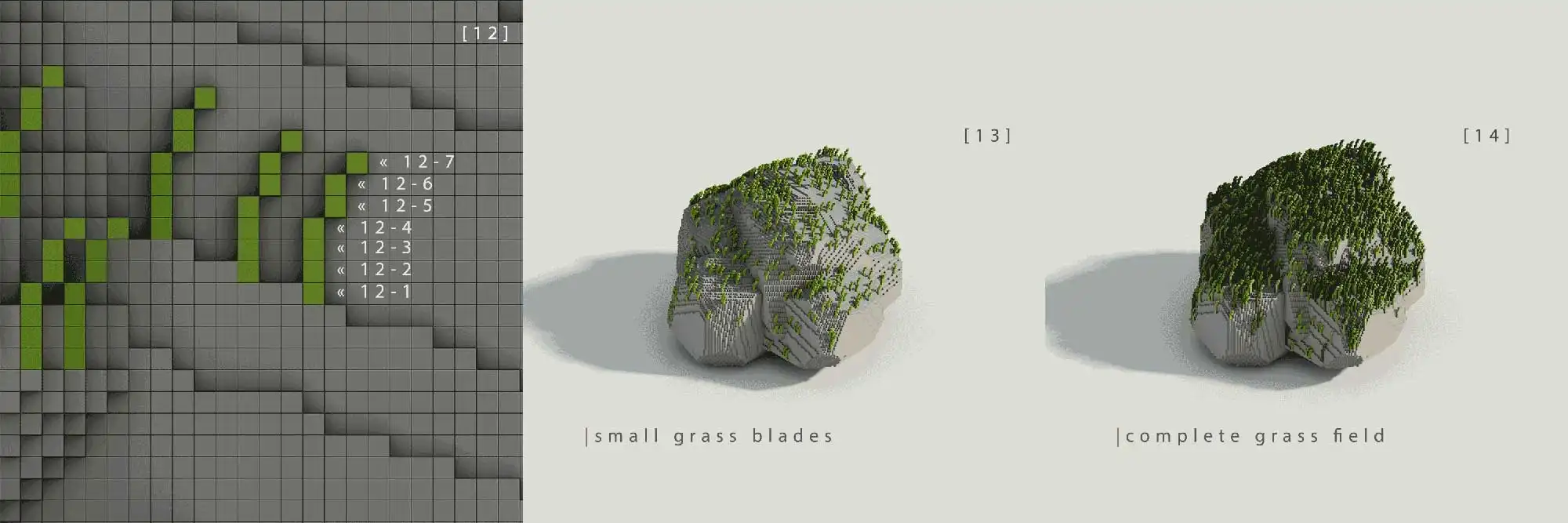
Vertical Growth
Finally, model — or rather grow — the grass blades. We start with the object that corresponds to the first green tone and perform several copy iterations. Grass height emerges from repeated z-axis offsets, while blade curvature is introduced through small lateral x-axis offsets.
How to start?
- Copy the first root layer and move it by +1 voxel along the z-axis.
- Repeat the process with increasing z-offsets to build blade height.
- Add small x-axis offsets in later steps to shape the blade profile.
- Repeat the same approach for mid-sized and tall grass with more iterations.
Design Rules
- Height is generated through copy iteration, not manual sculpting.
- Blade curvature comes from small lateral offsets.
- The same logic can be reused for short, mid, and tall grass blades.
Result & Applications
This approach is a powerful time saver and a key method for generating defined vegetation on a large scale. Grass or other low-level ground vegetation can be placed on complex surfaces, including undercuts and multi-folded geometry. The same approach is also suitable for adding snow layers to object surfaces.
Due to the separation into specific height layers, I gain full control over the structure of individual grass blades. This also opens the door to frame-by-frame vegetation animation and future perceptual physics workflows.
Design Rules
- Control always outranks randomness.
- Scalability depends on structured layer logic.
- Separated systems improve reuse, variation, and animation potential.